컴/폰
Javascript framwork Angular.js (2)
양재문
2023-03-08 15:00
조회수 : 37

6. AngularJS Module , AngularJS Controller
<!-- AngularJS Module -->
var app = angular.module('myApp', []);
<!-- AngularJS Controller -->
app.controller('myCtrl', function($scope) {
$scope.firstName= "John";
$scope.lastName= "Doe";
});
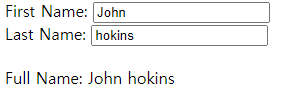
<div ng-app="myApp" ng-controller="myCtrl">
First Name: <input type="text" ng-model="firstName"><br>
Last Name: <input type="text" ng-model="lastName"><br>
<br>
Full Name: {{firstName + " " + lastName}}
</div>
<script>
var app = angular.module('myApp', []);
app.controller('myCtrl', function($scope) {
$scope.firstName= "John";
$scope.lastName= "Doe";
});
</script>
---------------------------
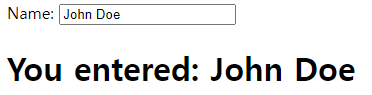
<div ng-app="myApp" ng-controller="myCtrl">
Name: <input ng-model="name">
<h1>You entered: {{name}}</h1>
</div>
<script>
var app = angular.module('myApp', []);
app.controller('myCtrl', function($scope) {
$scope.name = "John Doe";
});
</script>
 7.Adding a Directive
<div ng-app="myApp" w3-test-directive></div>
<script>
var app = angular.module("myApp", []);
app.directive("w3TestDirective", function() {
return {
template : "I was made in a directive constructor!" // 속성값으로 data 컨트롤
};
});
</script>
8.Modules and Controllers in Files
<div ng-app="myApp" ng-controller="myCtrl">
{{ firstName + " " + lastName }}
</div>
<script src="myApp.js"></script>
<script src="myCtrl.js"></script>
------
<!-- myApp.js
var app = angular.module("myApp", []);
-->
------
<!-- myCtrl.js
-app.controller("myCtrl", function($scope) {
$scope.firstName = "John";
$scope.lastName= "Doe";
});
-->
9. Repeating HTML Elements
<div ng-app="" ng-init="names=['Jani','Hege','Kai']">
<ul>
<li ng-repeat="x in names"> <!-- js for in 문 과 같은 반복문 names의 길이만큼 반복 -->
{{ x }}
</li>
</ul>
</div>

li 태그가 names 배열의 길이만큼 반복 출력 되었다
<div ng-app="" ng-init="names=[
{name:'Jani',country:'Norway'},
{name:'Hege',country:'Sweden'},
{name:'Kai',country:'Denmark'}
]">
<ul>
<li ng-repeat="x in names">
{{ x.name + ', ' + x.country }}
</li>
</ul>
</div>
위와같이 객체배열의 형태로 사용 가능
10.Create New Directives
<w3-test-directive></w3-test-directive>
<script>
var app = angular.module("myApp", []);
app.directive("w3TestDirective", function() {
return {
template : "<h1>Made by a directive!</h1>"
};
});
</script>
w3-test-directive 태그에 template 값을 저장해 반복사용이 용이하다