컴/폰
MySQL 데이터베이스 테이블 생성 및 다수의 레코드 삽입 데이터 검색 정렬
양재문
2023-02-05 15:00
조회수 : 9
여러 고객의 정보가 테이블에 담겨있는 데이터를 불러온다
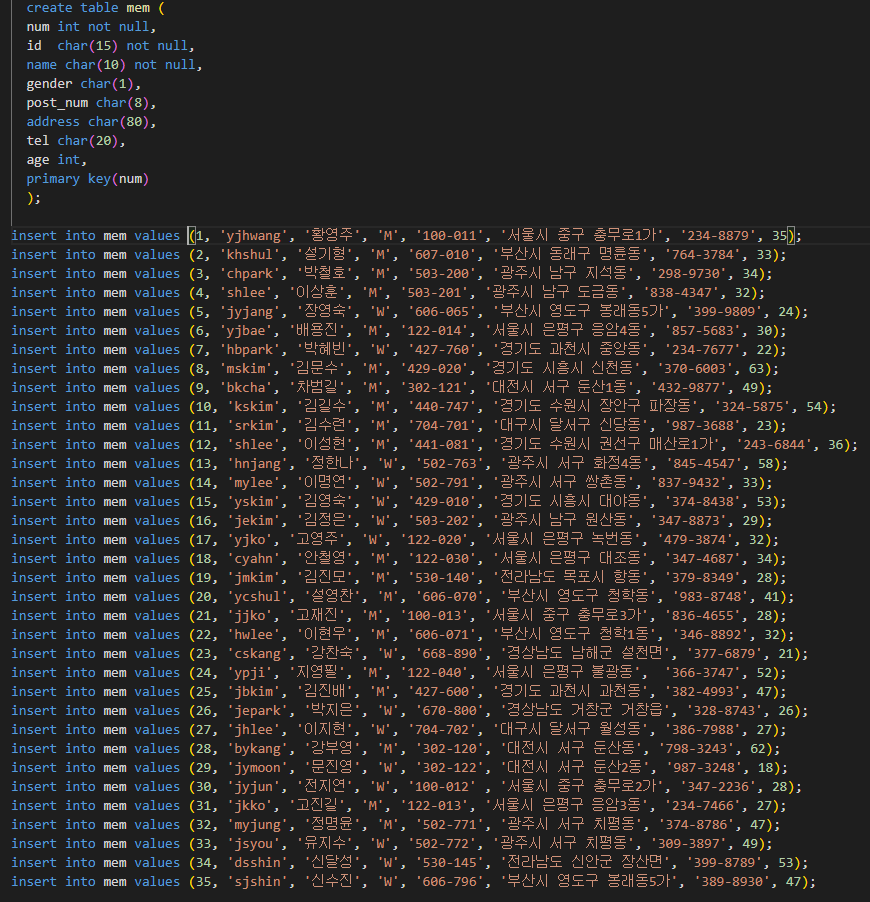
고객의 정보가 담겨있는 데이터
cmd 로 해당 데이터 sql 파일이 들어있는 폴더에 접근후 해당파일을 일괄 실행하여준다
sql 파일 일괄실행 방법
https://corineee.tistory.com/51
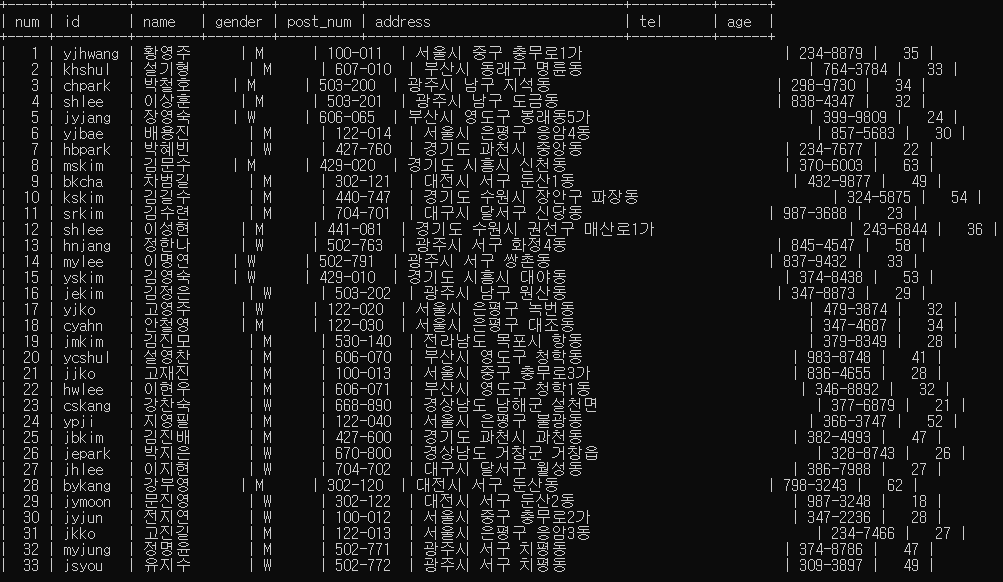
일괄실행 확인
레코드 검색 명령
select 문을 이용해 원하는filed 의 data만 출력할 수 있다.
mysql>select id,name,address from mem;
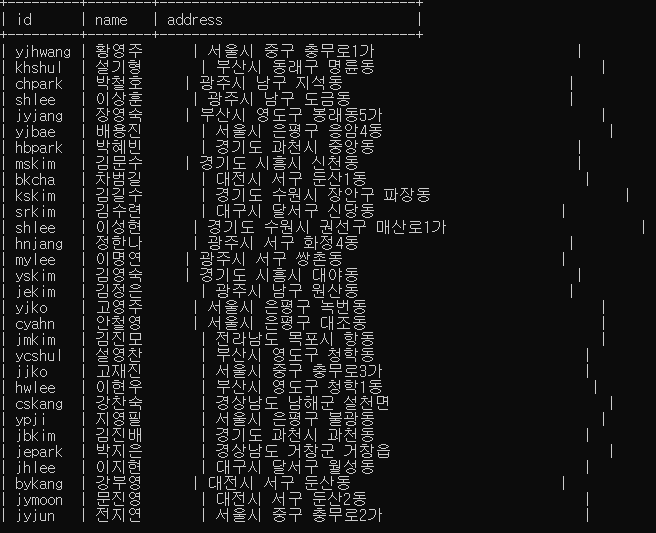
id,name,address Field 의 data만 출력되는 것을 확인할 수 있다
where 조건문을 사용한 data 출력
mysql>select id,name,address,tel,gender from mem where gender='W';
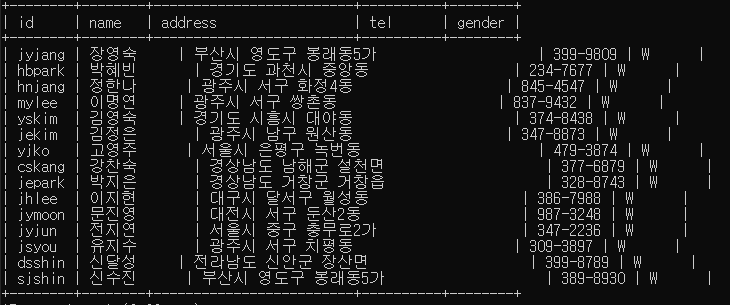
gender 값이 W 인 data만 출력된 것을 확인할 수 있다
where 조건 활용 예시
- where 조건절의 like '문자%' : 문자로 시작하는 데이터
- where 조건절의 like '_문자%' : _(언더바) 하나의 문자열 => 두번째 문자열이 '문자' 인 데이터
- where 조건절의 like '%문자%' : 문자가 가운데 위치하는 데이터
mysql>select * from mem where age>=50; // 50세 이상인 레코드의 전체 필드 보기
mysql>select * from mem where age>=20 and age<30; // 20대인 레코드의 전체 필드 보기
mysql>select * from mem where (age>=20 and age<30) and gender='M'; // 20대이고 남자인 레코드 전체 필드 보기
mysql>select * from mem where ((age>=20 and age<30) or (age>=40 and age<50)) and gender='W';
// 20대 또는 40대 여성인 레코드 전체 필드 보기
mysql>select name,id,address,age from mem where name='김진모'; // 이름이 김진모인 해당 필드 보기
mysql>select name,id,address,age from mem where name like '김%'; // 이름이 김씨인 해당 필드 보기
mysql>select * from mem where address like '부산%' and gender='W'; // 부산에 사는 여성의 모든 필드 보기
mysql>select * from mem where name like '__용%'; //가운데 글자가 용인 사람의 모든 필드 보기
mysql>select * from mem where name like '김%' and address like '광주%'; //광주에사는 김씨인 사람의 필드
mysql>select * from mem where address like '%은평구%' and gender='M'; // 은평구에 사는 남자
레코드 정렬 명령
*select 필드명1, 필드명2 form 테이블명 where 조건절 order by 필드명; // 오름차순 정렬
mysql>select age,id,name,gender,tel from mem order by age; // 나이 순으로 오름차순정렬 하고 해당 필드 보기
mysql>select age,id,name,gender,tel from mem order by age desc; // 나이 순으로 내림차순정렬 하고 해당 필드 보기
mysql>select age,name,address from mem where address like '서울%' order by age desc;
// 서울에 사는 나이가 많은 순서대로 정렬하고 해당 필드 보기
mysql>select num,id,name,address,tel from mem order by num desc limit 10; //10개의 레코드를 num필드값에 내림차순으로 검색
레코드 수정 명령
- 조건의 기준 필드는 primary key / 중복된 데이터가 저장되지 않은 필드(중복검사)
*update 테이블명 set 필드명=필드값 where 조건식;
mysql>update mem set tel='123-4567' where id='yjhwang'; //아이디가 yjhwang인 레코드의 전번을 123-4567로 수정
mysql>select id,name,tel from mem where id='yjhwang'; //아이디가 yjhwang인 해당 필드를 보기
mysql>update mem set age=27 where name='신수진'; // 신수진의 나이를 27세로 수정
mysql>select name,age from mem where name='신수진'; // 이름이 신수진인 해당 필드를 보기
mysql>update mem set age=30,tel='786-057' where name='이현우'; // 신수진의 나이를 27세로 수정
mysql>select name,age,tel from mem where name='이현우'; // 이름이 신수진인 해당 필드를 보기